Warung Online
Headlines News :
mas template
Home » » How to set up a logon message of ur choice?

How to set up a logon message of ur choice?

Written By Trik Cari Duit on Senin, 11 Oktober 2010 | 05.54

      This tweak will help you to set - up a logon message to pop - up as soon as your computer will boot up.. This is a simple trick that can be used to scare your friends or a prank useful to be played in colleges and schools to scare your IT lab heads.

Process:-
1) Open registry editor.

2) Go to HKEY_LOCAL_MACHINE >> SOFTWARE >> MICROSOFT >> WINDOWS NT >> CURRENT VERSION >> WINLOGON

3) Just click on Winlogon and look at the right-side pane and search for
LegalNoticeCaption (Modify its value. The value set here will be the heading of your message).
LegalNoticeText (Modify its value. This value is the actual pop-up data).
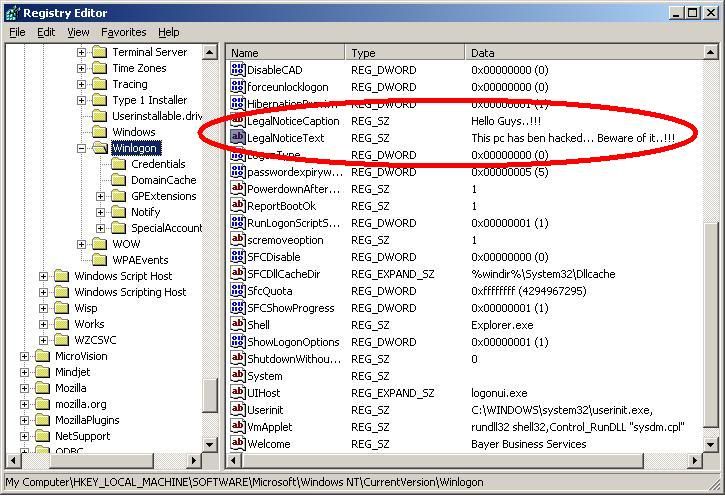

4) That's it... you have set the logon message. Now, refresh and exit registry and then reboot.
Share this article :

0 komentar:

Speak up your mind

Tell us what you're thinking... !

Bisnis Hot
Bisnis Hot


Copyright © . Tips N Trik - All Rights Reserved
Proudly powered by Blogger